Summary: Choose Pendora Lite if you want to test the sound, spend less, or add a compact preset selection beside Serum, Omnisphere, Kontakt, or Vital. Choose the full Pendora edition if you produce regularly and need 275+ presets, expansions, drumkits, MIDI, effects, and a broader beatmaking workflow in one purchase.
The practical answer to Pendora Lite vs full depends on how much material you need for your next sessions. If you are still evaluating the sound or want a smaller melodic layer, start with Pendora Lite vs full sound bank and compare the scope of each edition before paying for the larger package.
Both editions share the same focused direction for melodic trap, drill, R&B, pluggnb, dark trap, lofi, phonk, boom bap, and related production styles. The real difference is not only 30 presets versus 275+ presets. It is whether you want an evaluation edition or a broader sound bank with supporting production assets that can stay inside your regular FL Studio, Ableton Live, or Logic Pro workflow.
Pendora Lite vs full: quick comparison
Choose Lite for a lower-cost test and a compact browser. Choose the full edition when you want more sound-bank depth, more production material, and fewer reasons to leave the Pendora workflow while building a beat.
| Edition | Preset depth | Included content | Price | Best fit |
|---|---|---|---|---|
| Pendora Lite | 30 hand-picked presets | Bonus kits and a MIDI pack | €29 or $29, one-time purchase | Testing the sound, occasional beatmaking, or adding a focused melodic layer |
| Pendora V3 full edition | 275+ presets across 30+ categories | Three expansion packs, Producer Kit, two drumkits, MIDI, mix presets, FX, and risers | €149 on some pages and $147 on another, check checkout | Regular beatmaking, commercial beats, placements, and broader genre-focused workflows |
Pendora Lite
Best for: Producers who want to test the sound, keep the initial purchase smaller, or add a focused preset source beside Serum, Omnisphere, Kontakt, or Vital.
Pendora Lite includes 30 hand-picked presets, bonus kits, and a MIDI pack. Its smaller scope can be useful when too many options slow down your session. Instead of opening a large general-purpose library and filtering through sounds that do not fit the beat, you can work from a compact selection aimed at modern trap, drill, phonk, pluggnb, and related styles.
The main advantage is low commitment. Lite is priced at €29 or $29, uses a one-time purchase model, and includes royalty-free commercial use plus free lifetime updates under the stated licensing terms. The product page displays a 4.62/5 rating from 13 verified-buyer reviews, which offers useful product context, although the rating cannot predict whether every preset will suit your personal workflow.
Pros:
- Lower entry price for producers who want to evaluate the sound before choosing the larger edition.
- Compact preset selection can reduce browsing time and help overcome beatblock.
- Includes bonus kits and a MIDI pack rather than providing only a small preset folder.
- Supports commercial use under the stated royalty-free terms and includes free lifetime updates.
Cons:
- Thirty presets may feel limited if you produce several beats each week.
- It does not include the full edition’s expansion packs, broader drum content, FX, mix presets, and larger preset range.
- There is no established automatic price credit or guaranteed upgrade discount stated for moving from Lite to Full.
Pendora V3 full edition
Best for: Producers who want a complete, genre-focused sound-bank workflow for regular beatmaking, commercial releases, client work, placements, or beat licensing.
The full Pendora V3 edition expands the compact Lite concept into a broader instrument with 275+ studio-ready presets across more than 30 sound categories. The palette includes bells, pads, plucks, synths, keys, orchestral textures, banjos, basses, dark 808s, and other melodic sources for trap, drill, phonk, dark trap, boom bap, lofi, pluggnb, and related styles.
The package also includes three expansion packs, a Producer Kit, two drumkits, MIDI content, mix presets, an FX pack, and risers. That combination gives the full edition a more complete beatmaking workflow. You can choose a melodic sound, develop a MIDI idea, build the drums, and add transitions without immediately searching through several unrelated libraries.
The full edition page displays a 4.71/5 rating from 59 verified-buyer reviews. This is useful product-page context, but the strongest buying evidence remains whether the sounds fit your genres, computer, DAW, and creative process.
Pros:
- More than 275 presets provide substantially greater sound-bank depth than Lite.
- Genre-focused categories help keep browsing relevant to trap, drill, phonk, dark trap, boom bap, lofi, and pluggnb sessions.
- Expansions, drumkits, MIDI, mix presets, FX, and risers support more stages of beat development.
- One-time ownership avoids recurring subscription payments.
- Royalty-free commercial use applies to beats and tracks you sell, place, or license under the stated terms.
- Free lifetime updates cover compatibility changes, format updates, and bug fixes under the product conditions.
Cons:
- The higher upfront price is harder to justify if you only make occasional beats.
- The focused genre direction is not intended to replace a general-purpose library for every style of music.
- The installed product requires approximately 5 GB of storage, so available disk space should be checked before installation.
Which edition fits your beatmaking workflow?
Imagine opening FL Studio with a drum pattern already in place but no central melody. Lite gives you a smaller set of directions, which can be helpful when you want to make a decision quickly. Full gives you more ways to develop the same idea through different bells, pads, plucks, keys, 808s, textures, and supporting production assets.
Lite works particularly well when your setup already includes broad instruments such as Serum, Omnisphere, Kontakt, or Vital. In that situation, you may not need another large library. You may only need a smaller source of distinctive sounds for a drill melody, a phonk texture, a pluggnb progression, or a dark trap counterline.
The full edition is more practical when Pendora is expected to become a recurring part of your sessions. Its wider selection gives you more room for layering, resampling, arrangement changes, and repeated use across commercial beats. The additional kits and MIDI content also make it easier to keep a project moving when the first preset is close but not quite right.
For a closer look at the broader package, our full Pendora sound bank combines the main instrument with its additional production material. The important distinction is that Pendora is not designed to cover every genre. Its value comes from staying focused on the production lanes where its sounds are most relevant.
Compatibility, installation, and system resources
Before choosing either edition, check your operating system, DAW, plugin format, and available storage. Pendora supports VST3 compatibility on Windows and macOS, while AU support applies to macOS hosts. Stated operating-system support is macOS 11 Big Sur or later and Windows 10 or 11, with 64-bit systems required.
The products are explicitly tested with FL Studio, Ableton Live, Logic Pro, Cubase, Pro Tools, and Reason. Native Apple Silicon support is provided, which matters for producers working on newer Mac systems. Windows users generally need a compatible VST3 host, while Mac users can use VST3 or AU depending on the DAW and setup.
Pendora is positioned for low CPU/RAM use, which can be useful when several instances are loaded alongside Serum, Vital, Omnisphere, Kontakt, and effects. Any performance figure tied to an i5-8400 system is an example rather than a universal guarantee. Actual CPU and RAM use depends on buffer settings, project size, polyphony, effects, sample rate, and the rest of the session.
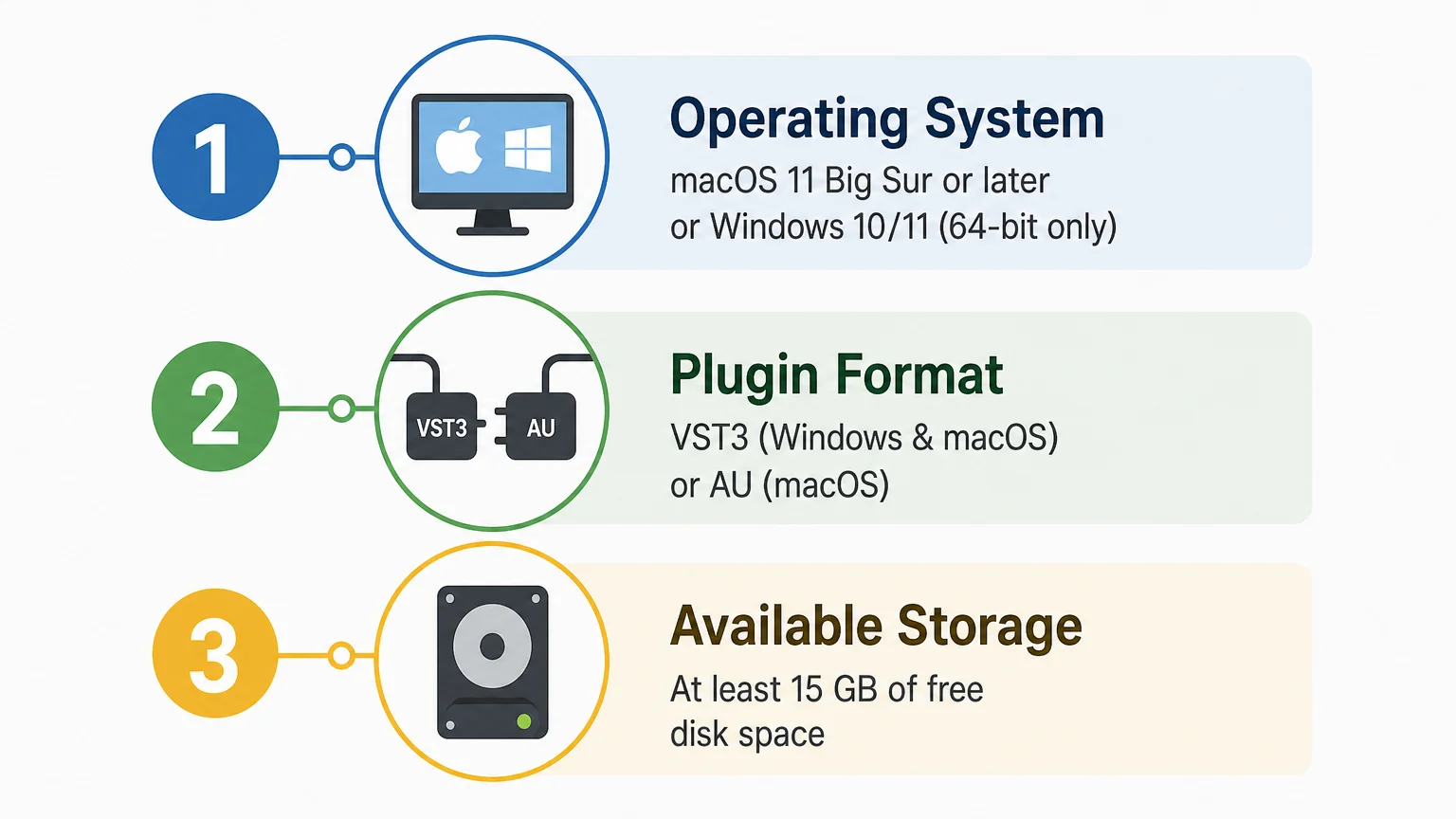
Installation is delivered digitally through a download link and license key. The installer auto-detects the DAW, and the installed product occupies approximately 5 GB of hard-drive space. The Windows installer is described as approximately 2 GB, so leave room for the download, installation files, future updates, and project content.
Licensing, updates, and ownership
Both editions use a one-time purchase model rather than a subscription. The products include commercial licensing described as royalty-free for beats and tracks that you sell, place, or license, with no additional royalties owed under the stated terms.
Royalty-free use does not mean that the original product files can be redistributed. Account sharing and redistribution are excluded, so the license should be used through the buyer’s authorized account. Pendora may be installed on up to three personal computers. Studio installations beyond that allowance require contacting Tiger-Sounds.
Free lifetime updates are included under the product conditions. These updates cover operating-system compatibility, plugin-format changes, and bug fixes. For producers who reopen older FL Studio, Ableton Live, or Logic Pro projects over several years, one-time ownership can provide a more predictable cost structure than recurring access fees.
Price and the path from Lite to Full
Pendora Lite is priced at €29 or $29. The full edition is listed at €149 on some pages and $147 on another, so international buyers should check the currency and final total shown at checkout. A full-page bundle also displays a stated $499 value before the listed $147 purchase price, which makes it especially important to rely on the current checkout presentation rather than assume that one figure applies in every location.
Lite is the safer choice when you are uncertain about the sound, the preset character, or compatibility with your system. The free Temple Drumkit also provides an evaluation path before a larger purchase, although it requires newsletter signup. You can hear the sound in a production context through the Pendora demo before deciding whether the smaller or broader edition fits your sessions.
Starting with Lite can be sensible when your current projects are simple or when you want to test Pendora beside your existing instruments. However, producers who already know they need expansions, multiple drumkits, MIDI, FX, and a much wider preset range may save time by choosing the full edition immediately.
One naming detail to check before buying
Pendora VST by Tiger-Sounds is separate from the unrelated Cymatics PANDORA plugin. The names are similar, but the products come from different companies and should not be treated as Lite and Full versions of the same instrument.
When searching for the correct product, confirm the developer name, included content, supported formats, operating system, and license terms. This avoids downloading the wrong instrument when your goal is the Pendora sound bank for trap, drill, phonk, pluggnb, or dark melodic beatmaking.
Conclusion
Choosing between Pendora Lite and the full edition comes down to commitment and workflow depth. Lite is the practical entry point when you want to test a focused sound bank, keep the cost low, or add a compact melodic layer beside your existing instruments. The full edition is the stronger fit for regular producers who need broader preset coverage, expansions, drumkits, MIDI, FX, and a reusable production environment. Check the checkout price, system requirements, genre fit, and licensing terms before purchasing.
Choose the Pendora edition for your workflow
If you are unsure whether the Pendora sound fits your beats, starting with a compact edition gives you a practical way to test the workflow inside your own DAW. It can help you judge preset character, genre fit, installation, and CPU behavior before moving toward a larger sound-bank setup.
Pendora Lite includes 30 hand-picked presets, bonus kits, and a MIDI pack for producers working across trap, drill, phonk, pluggnb, dark trap, and related styles. It is a one-time purchase with VST3 and AU support where applicable, royalty-free commercial use under the stated terms, and free lifetime updates.
Frequently Asked Questions
Should I choose Pendora Lite or the full edition for regular beatmaking?
Choose Lite if you want to test the sound or use a compact selection beside Serum, Omnisphere, Kontakt, or Vital. Choose the full edition if you produce regularly and need 275+ presets, expansions, drums, MIDI, FX, and a broader workflow.
What is included with Pendora Lite?
Pendora Lite includes 30 hand-picked presets, bonus kits, and a MIDI pack. It is designed as an evaluation-oriented entry product rather than a complete replacement for the broader Pendora package.
Does Pendora work with FL Studio, Ableton Live, and Logic Pro?
Pendora supports VST3 on Windows and macOS, plus AU on macOS, and is explicitly tested with FL Studio, Ableton Live, Logic Pro, Cubase, Pro Tools, and Reason. Supported systems include macOS 11 Big Sur or later and Windows 10 or 11, 64-bit only.
Is the full Pendora edition a subscription?
No. Pendora editions are sold as one-time purchases, with free lifetime updates under the stated product terms. Commercial use is royalty-free for applicable beats and tracks, while account sharing and redistribution are excluded.
Can I start with Lite and buy the full edition later?
Yes, you can begin with Lite and purchase the full edition later if your production needs grow. The supplied product information does not establish an automatic upgrade discount or guaranteed price credit, so check the current offer before buying.





