Summary: Trap Serum presets become limiting when familiar sounds go unchanged from one beat to the next. Keep them as starting points: choose a patch for its role, reshape its envelope and tone, adjust the MIDI and effects, then judge it in the full mix. A small amount of intentional editing can preserve speed while building a more personal sound.
When a melody sounds finished as soon as you load a patch, it is easy to build the whole beat around the preset instead of shaping it to fit your idea. For trap producers, that can turn quick sound selection into a repeating palette. If you want sounds beyond Serum in your workflow, browse our trap presets and sounds for producers. Pendora is a separate sound-bank VST, not a Serum preset bank, so treat it as another instrument in your setup rather than a Serum library.
The issue is not using presets. It is relying on the same few patches, MIDI habits, and effect choices without asking what the track needs. A preset can save time and give you a useful starting tone, but the arrangement, performance, and edits determine how that tone works in your beat. A short process for choosing and reshaping sounds can keep the convenience while helping your production develop its own character.
When do trap Serum presets start to feel limiting?
Imagine opening Serum, scrolling through familiar trap leads, and choosing the first patch that sounds impressive on its own. It may still feel out of place when the 808, hats, and vocal enter. The lead might occupy too much of the upper mids, its reverb may blur the rhythm, or its stereo width may pull attention away from the central groove.
That mismatch is a useful distinction: a preset is not automatically generic, and a sound that feels familiar is not automatically wrong. The limitation appears when you keep choosing sounds by solo impact rather than by their role in the arrangement. A bright bell can work as a sparse counter-melody, for example, but crowd a busy lead if both use the same register and rhythmic space.
Start by identifying the job of the sound: lead, counter-melody, pad, pluck, or texture. Then listen with the drums and bass playing. This brings the choice back to sound selection in context, where tone, note length, register, and space matter as much as the preset name.
How can you make a preset fit your beat?
Take a trap lead that sounds too bright and long. Rather than replacing every part of the patch, make a few edits with a clear purpose. Shorten the release if its tail runs into the next kick or snare, lower the filter cutoff if its top end crowds the hats, and reduce reverb if the melody loses definition.
Then try a different MIDI phrase before rebuilding the sound. Change the octave, shorten the notes, or leave a gap where the drums need space. A preset can seem less distinctive when you play the same long notes in the same register every time. Changing the note pattern often changes the sound’s role without adding another layer.
For trap, drill, melodic trap, or pluggnb, choose a sound that suits the style and leave room to personalize it. Our sound banks for trap production are an option when you want material beyond Serum. Whatever source you choose, audition it against the beat and keep the parts that serve the track, not just the ones that sound large in isolation.
How do you balance preset use with learning sound design?
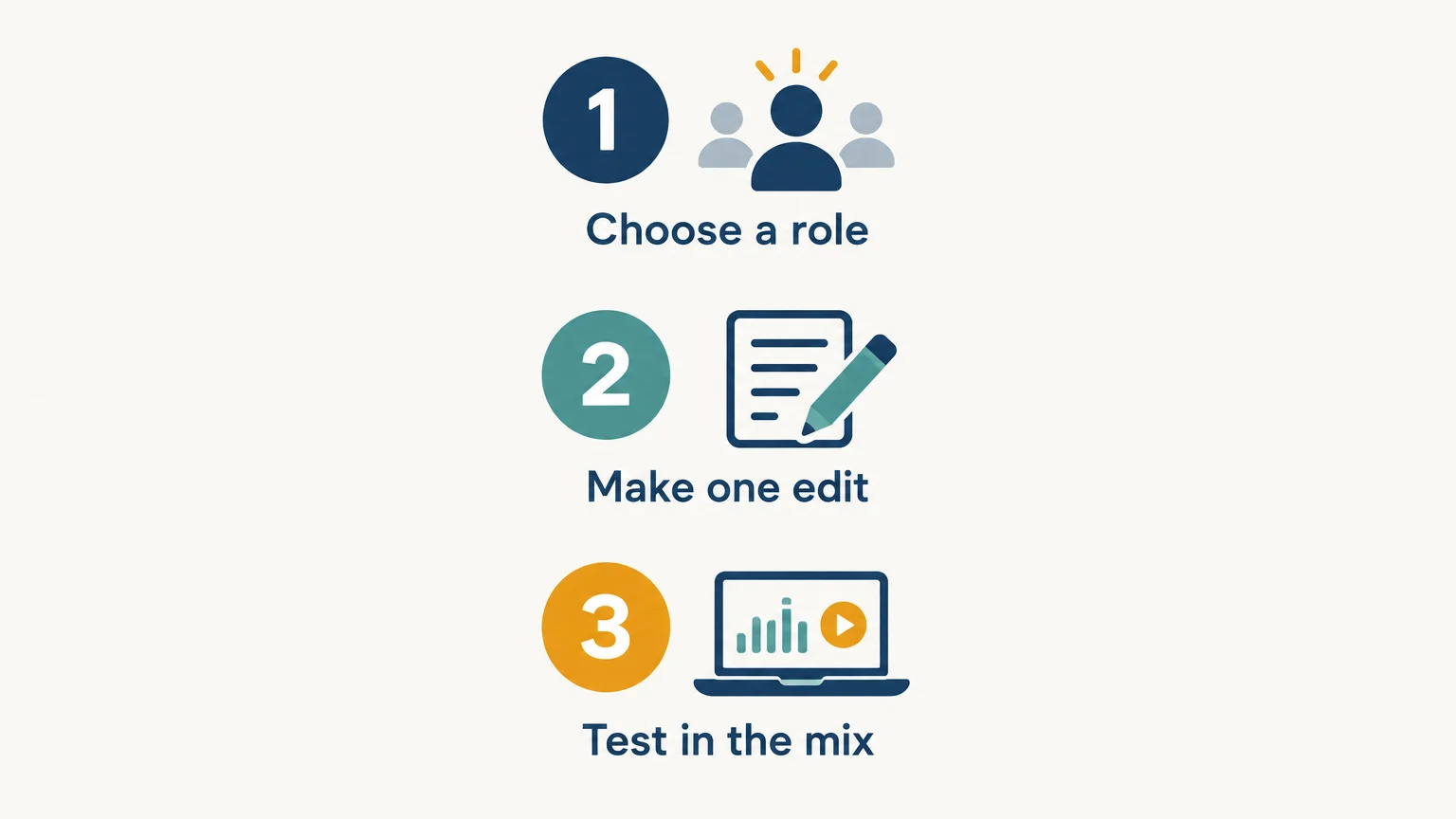
Use a simple three-pass approach. First, choose a patch that is close to the sound’s intended role. Second, make one or two edits, such as changing the envelope, filter, wavetable position, or effect amount. Third, compare the result in the arrangement and save a version only if it works better there.
This keeps sound design focused. If you change many controls at once, it is harder to learn which edit made the patch more useful. Instead, make one change, play the same short phrase, and compare. In Serum, testing a filter or envelope change against the same MIDI gives you a practical way to learn how that control affects the sound.
Presets can also be useful study material. Open the controls that shape the sound, note what affects its attack or movement, and try recreating one feature in a blank patch. You do not have to rebuild every sound from scratch. A small amount of deliberate practice with Serum sound design is enough to help you make better edits when a preset is nearly right.
Why does a sound need to work in the full arrangement?
A preset is one part of a beat, not a finished musical decision. A wide pad that feels rich on its own may mask a vocal sample, while a thick lead may compete with a bell melody. Before adding another layer, check whether changing the sound’s register, volume, or note density would solve the problem more cleanly.
Originality is not only about how a synth patch was made. A paper titled “The preset is dead” discusses longstanding criticism of preset use in audio production. In practice, the track also gets its identity from rhythm, harmony, arrangement, and the way sounds interact. Treat the patch as one choice among many, not the sole measure of whether a beat is personal.
For a more distinctive result, vary one or two musical details: leave space after the lead phrase, shift a counter-melody, or automate the filter at the end of a section. If you work in FL Studio, our underground FL Studio presets page is another sound-design reference for that environment. The useful test is whether the choice supports this beat, not whether it is unusual in isolation.
What if preset browsing is taking over the session?
Set a stopping point before you start auditioning sounds. Pick a patch that is close to the role you need, give it a few purposeful edits, then return to writing or arranging. Endless browsing can feel productive while the beat itself stays unchanged.
Save edits that solve a recurring need, and name them by function rather than by a vague mood. A short pluck with a controlled tail, for instance, is easier to find later than a file called “new sound.” If you use FL Studio, our FL Studio presets page offers a relevant starting point for preset-based work in that DAW. Keep the sounds you use, discard the ones that do not serve your productions, and build a small working palette.
Make the preset serve the beat
Trap Serum presets are useful when they help you move from an idea to a working sound. Avoid letting familiar patches dictate every melody: choose by role, make a few deliberate changes, and listen in the arrangement before adding more layers. That approach keeps preset-based beatmaking efficient while giving your musical decisions room to shape the result.
Explore sounds for trap production
If Serum is part of your workflow but you want a different instrument and sound palette to work with, consider a focused sound bank alongside your existing synths. Pendora is a separate VST sound bank, not a Serum preset pack, and Tiger-Sounds has made and sold it since 2020.

Our Pendora sound bank for trap production includes hand-crafted presets and production assets for trap, drill, dark trap, phonk, boom bap, and pluggnb. The editions are one-time purchases, and commercial use is royalty-free under the stated product terms, which exclude account sharing and redistribution. Check the supported formats and system requirements for your setup before choosing an edition.
Frequently Asked Questions
Are Serum presets a shortcut or a creative limitation?
They are a shortcut when they help you reach a useful starting sound quickly. They become limiting when you repeatedly use the same patches without adapting them to the beat.
What should I change first in a trap Serum preset?
Start with the control that relates to the problem you hear. Adjust the envelope for note length, the filter for brightness, or the effects for space and texture.
Do I need to design every synth sound from scratch?
No. Presets can be practical starting points, and editing selected controls can help you learn synthesis without rebuilding every patch. Make a sound from scratch when the track needs something your current palette does not provide.
How do I stop a preset from clashing with my drums?
Listen to it with the drums and bass playing, then check its register, note length, effects, and level. Shortening notes or reducing reverb can make more room without adding another layer.
Is Pendora a set of Serum presets?
No. Pendora is a separate sound-bank VST for compatible DAWs, not a Serum preset library. Check its supported plugin formats and system requirements against your setup before using it.





